Bring every location, every team and every tool into one view. Maistro connects sales, stock, staffing and financial data so HQ can see what is happening, plan what comes next and act through AI — all from one place.
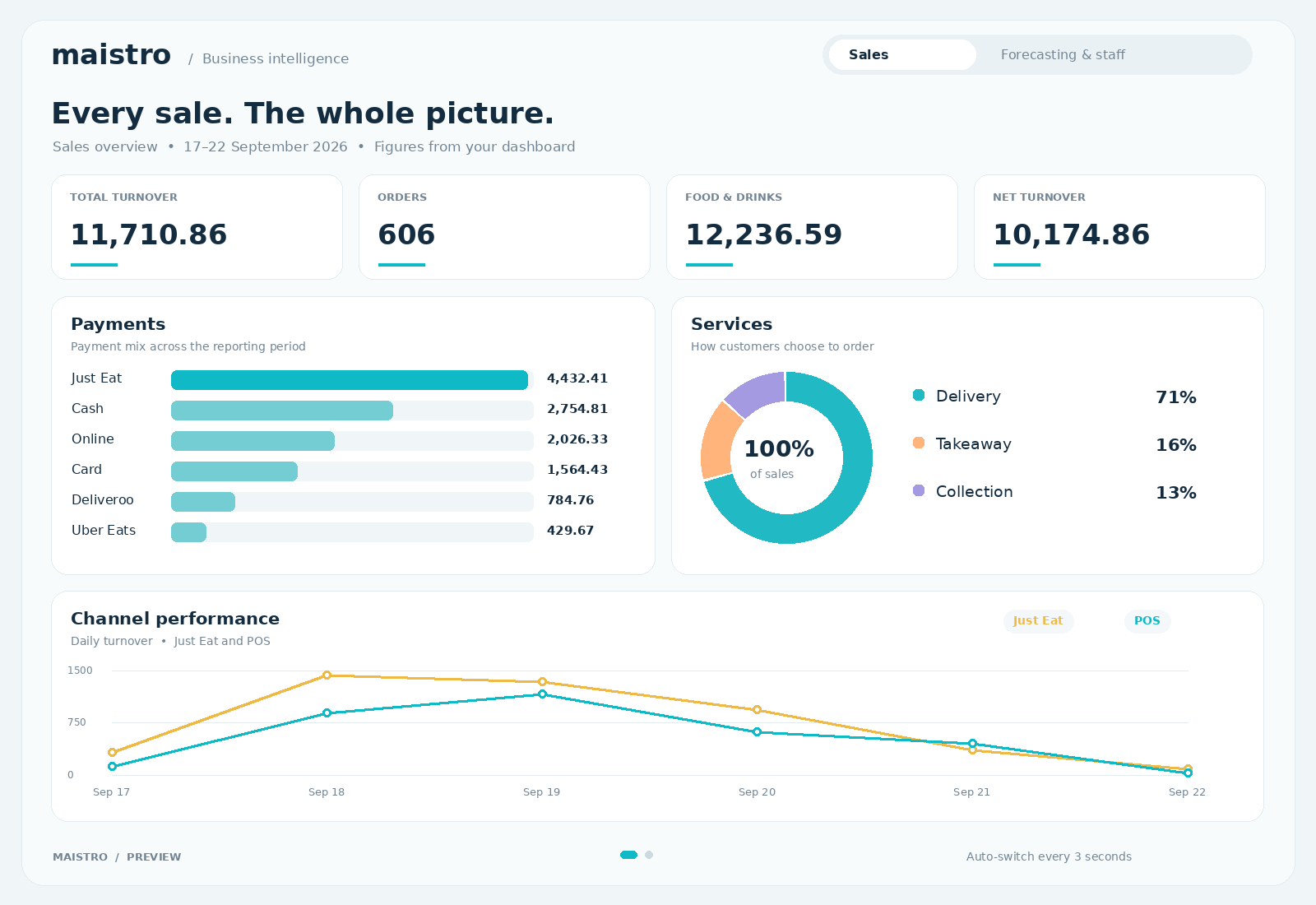
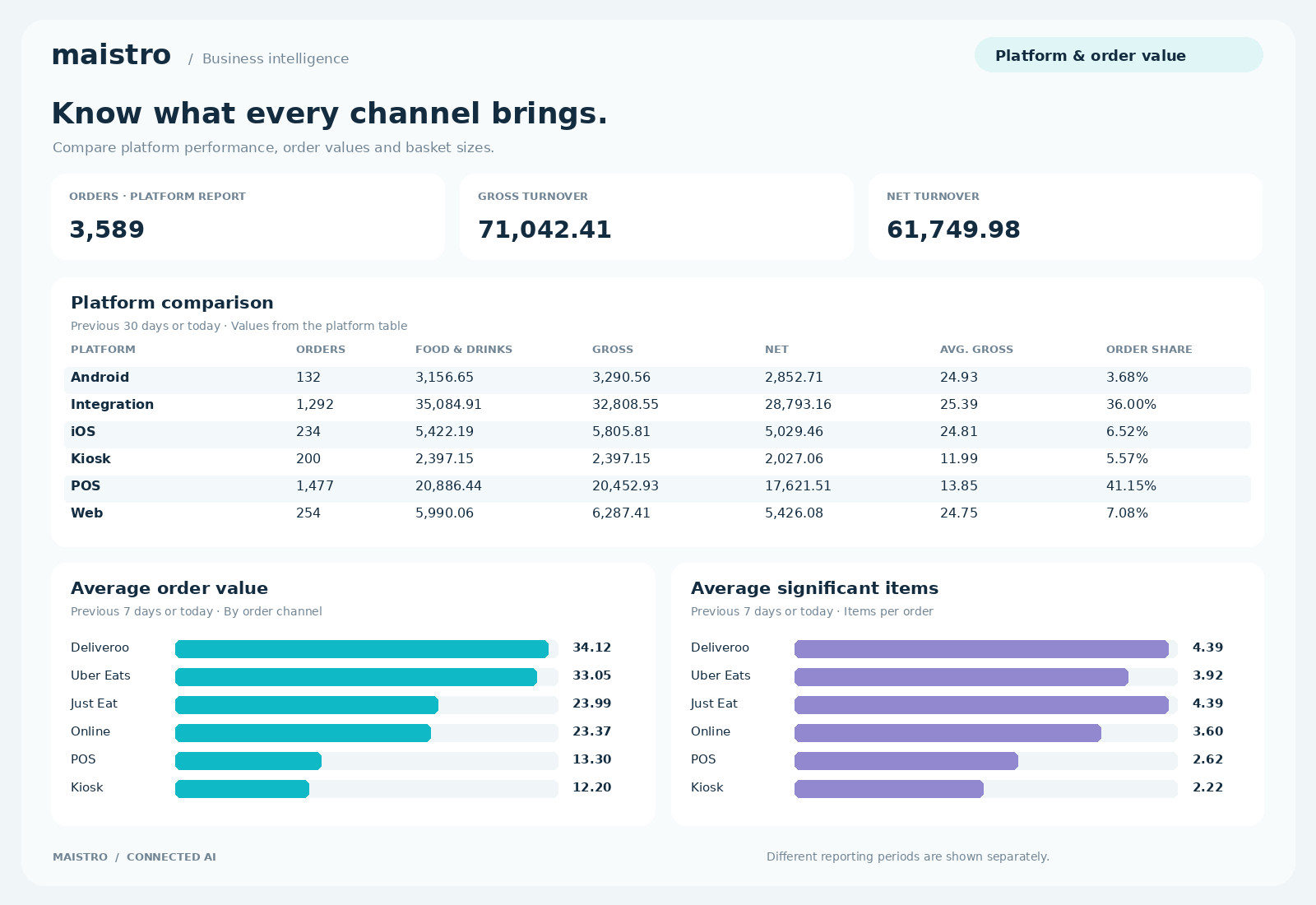
Sales, stock, staff and channel performance. One connected view. Illustrative dashboards · Open full size for a closer look.
Control the whole business. Ask questions. Create dashboards. Get work done.
Keep the whole group in view+
Connect the group picture with individual venues. Sales, stock, staffing costs and financial information help HQ understand where to focus, while local teams bring the context of what happened on the floor.
Six modules, working together+
HQ & Financial Hub, Stock Manager, Menu Manager, Staff Management, Direct Sales & CRM and Voice each address a different part of the operation. Their value grows when the information connects: an order is also ingredient usage, kitchen workload, revenue and a customer interaction. Your menu sits at the heart of that picture, connecting what is ordered to how it is made and what it costs.
AI that predicts, plans and gets things done+
Stock and staffing forecasts consider weather, events, holidays, past sales and other conditions. Staff schedules also account for staff holidays. At HQ, agentic AI can answer questions, create dashboards and carry out administrative tasks. Across service, dispatch, kitchen timing and digital signage keep the operation moving together.
Ask questions about your business+
Ask Maistro questions about the information connected to HQ. Rather than piecing together separate reports, start with what you want to understand. For example: how do this week’s sales compare across locations? This is an illustrative question, not a customer result.
Create dashboards through AI+
Use AI to create dashboards around the business view you need. Turn a question or reporting need into a dashboard, giving HQ a way to see the relevant information without starting every view from scratch.
Run administrative tasks+
Agentic AI can carry out administrative tasks through HQ as well as answer questions. That gives the team a way to get work done through AI, with the specific tasks and connected systems agreed for the operation.
Start with the pressure point+
You do not need to tackle every part of the business at once. Start the conversation with the problem you want to solve, then map the relevant modules and the systems they need to connect to. Scope and availability are agreed for your operation.
WHY IT MATTERS
HQ gets a clear view across the business, with connected AI to turn that information into decisions and action.
Tell us which administrative jobs take up your team’s time. We’ll walk through the tasks and connections Maistro can handle for your setup.
02 AI Voice
More calls. More upsells. Less interruption.
Maistro AI Voice, launched with AWS, takes as many calls as needed at the same time, takes orders and offers relevant upsells. It can identify phone numbers and addresses, with guardrails for rogue orders. Your team keeps service moving while AI handles the phones.
The phone rings. Tickets pile up. Your team is pulled away from service.
☎ Incoming call…
☎ Another call waiting…
Illustrative conversation · No audio plays
Every call at once. Relevant extras. Guardrails built in.
Upselling built into the conversation+
A side, a drink or an extra topping: AI Voice offers relevant additions while taking the order. Each call is a chance to help customers complete their meal and increase order value, with the choice always theirs.
As many calls as needed, at once+
The dinner rush does not have to become a queue for the phone. Maistro AI Voice handles as many simultaneous calls as needed, taking menu choices while your team serves the customers in front of them.
Phone number and address identification+
AI Voice can identify phone numbers and addresses as part of the ordering conversation, helping capture the customer details needed for the order.
Guardrails for rogue orders+
Built-in guardrails help protect the ordering flow from rogue orders. We agree the checks and handling rules for your operation, including when your team should step in.
Customer order support+
Voice also helps customers with their orders. Connected order information and the agreed handover process determine which queries it can resolve and when a person needs to step in.
One telephone-ordering team for multiple stores+
For businesses with a central call team, one team can take orders for multiple stores and route each order to the right kitchen. This staffed workflow sits alongside Maistro’s AI Voice service.
WHY IT MATTERS
Capture phone orders at busy times, offer the extras and keep your team focused on service.
Voice is launched with AWS. We’ll agree your menu, upsell options, order guardrails and handover arrangements together.
03 AI Stock & margins
Protect your food margins. Start with what comes next.
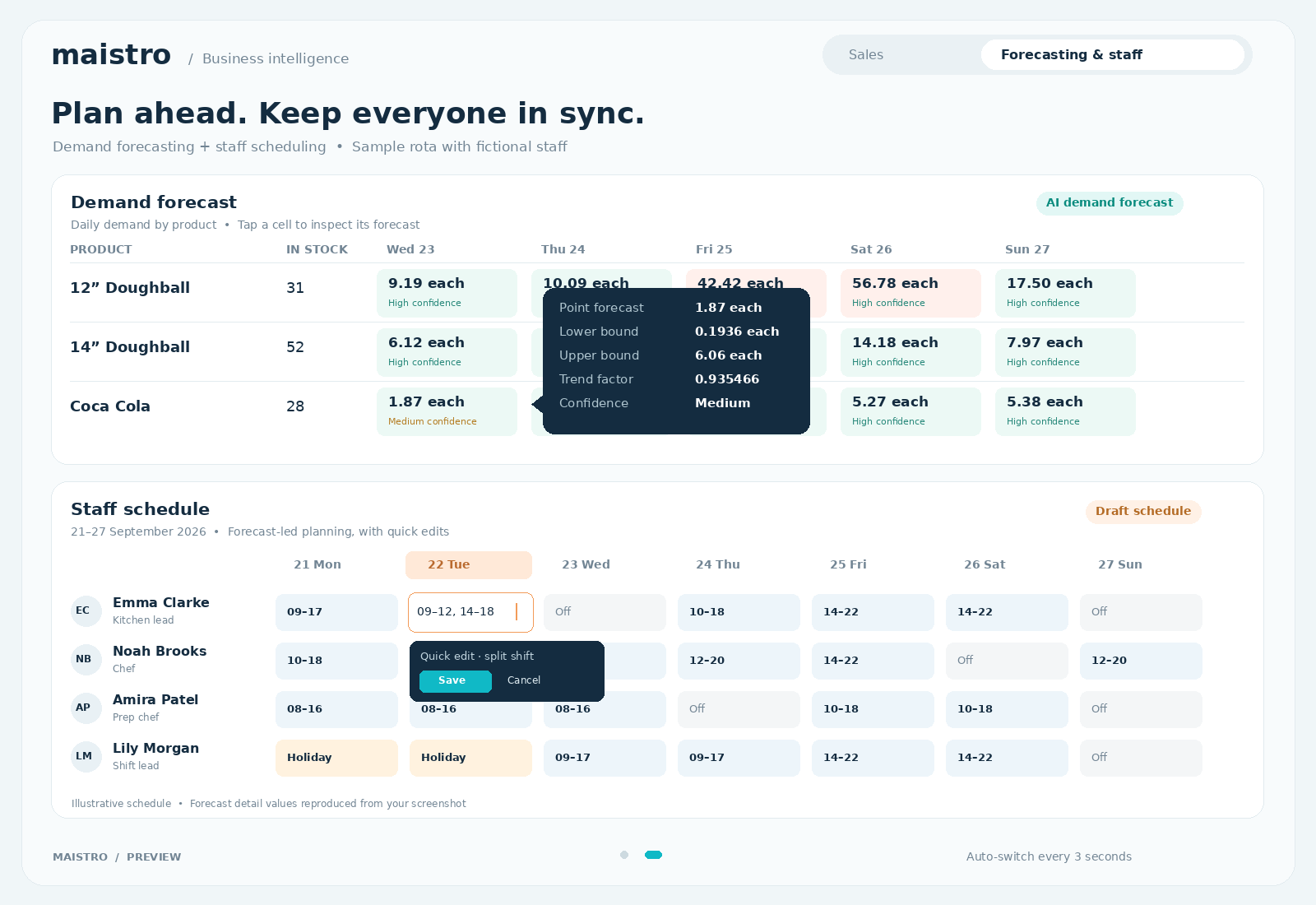
Maistro AI forecasts sales and stock needs using weather, events, holidays, past sales and other conditions. Bring those predictions together with recipes, current stock and central ordering to plan what the business needs and keep food costs in view.
Watch the week unfold. Pause to inspect or edit a forecast.
Illustrative demand forecasts by product with confidence ranges and stock runway
PRODUCT
STOCK
Wed, Sep 232026-09-23
Thu, Sep 242026-09-24
Fri, Sep 252026-09-25
Sat, Sep 262026-09-26
Sun, Sep 272026-09-27
Mon, Sep 282026-09-28
Tue, Sep 292026-09-29
COCA COLA 330MLDRINKS/BEVERAGESAvg Lead Time: 2 days
126.00 pCurrent Stock
132.00 pOpening Stock
COKE ZERO 330MLDRINKS/BEVERAGESAvg Lead Time: 2 days
354.00 pCurrent Stock
381.00 pOpening Stock
DIET COKE 330MLDRINKS/BEVERAGESAvg Lead Time: 2 days
74.00 pCurrent Stock
82.00 pOpening Stock
FANTA 330MLDRINKS/BEVERAGESAvg Lead Time: 2 days
100.00 pCurrent Stock
106.00 pOpening Stock
FRUIT SHOOTS APPLE & BLACKCURRANTDRINKS/BEVERAGESAvg Lead Time: 3 days
48.00 pCurrent Stock
48.00 pOpening Stock
FRUIT SHOOTS ORANGEDRINKS/BEVERAGESAvg Lead Time: 3 days
22.00 pCurrent Stock
24.00 pOpening Stock
KIDS STILL WATER 250MLDRINKS/BEVERAGESAvg Lead Time: 1 days
25.00 pCurrent Stock
25.00 pOpening Stock
MONSTER MANGO LOCO 500MLDRINKS/BEVERAGESAvg Lead Time: 2 days
4.00 pCurrent Stock
4.00 pOpening Stock
No products match your filters.
Illustrative data. Colours show stock remaining after forecast demand, before deliveries. Confidence describes the demand estimate, not stock availability. Tap a cell to inspect or edit its sample forecast.
AI demand forecasting. Smarter purchasing. A clearer view of every ingredient.
01
Predict demand
Weather, events, holidays and past sales shape the forecast.
02
Plan purchasing
See stock needs and lead times. Coordinate orders centrally.
03
Protect food margins
Compare recipe usage with actual stock, waste and counts.
ILLUSTRATIVE EXAMPLE · ONE PERIOD
€3,000Expected food usage
€3,450Actual food usage
€450Variance to investigate
The €450 difference is not automatically recoverable profit. Check counts, recipes, waste, deliveries and timing before drawing a conclusion.
Forecast sales and stock needs+
Maistro AI considers weather, events, holidays, sales history and other conditions to forecast demand and stock requirements. The result gives purchasing a forward view, rather than relying on last week’s order.
Central ordering+
Manage stock purchasing centrally, with supplier orders and internal venue orders in the stock workflow. Use forecast demand and current stock to plan requirements, then track orders through booking and receipt. Internal ordering connects a requesting venue with a supplying venue.
Recipes, sizes and portions+
Connect products and modifiers to the ingredients and quantities they use. A small pizza, a large pizza and an extra topping can consume different amounts of the same ingredient. Those quantities connect sales to expected stock usage.
Theoretical versus actual usage+
Theoretical usage is what recorded sales should have consumed according to recipes. Actual usage comes from stock movement and counts. For a simple period without transfers or other adjustments, it is opening stock plus purchases minus closing stock. Compare the same period and units to find the gap.
Counts, deliveries and waste+
Keep receipts, counts, waste and transfers up to date so the stock picture is explainable. Supplier lead times matter when deciding when to order: the weekly example above shows how a forecast shortage can be spotted before service.
WHY IT MATTERS
Plan stock around expected demand and get a clearer view of where food margin goes.
Central ordering here means stock purchasing and internal venue orders. The forecast supports the plan; counts and stock movements explain the result.
04 AI Staff scheduling
The right team. The right shift. Labour costs in view.
Maistro AI predicts the staff you will need using weather, events, holidays, past sales and other conditions. It then creates schedules based on that expected demand and staff holidays, bringing the trading forecast and the people plan together.
Fictional staff roster. Hover or focus a shift for its cost, click to edit.
Name
21 Mon
22 Tue
23 Wed (Today)
24 Thu
25 Fri
26 Sat
27 Sun
Totals
TotalsHours · estimated pay
Front of House
ECEmma ClarkeBartender
NBNoah BrooksHost
APAmira PatelServer
LMLily MorganServer
Kitchen
JBJamie BrooksHead Chef
SWSofia WalshChef
⠿ 12:00–23:00⠿ 14:00–17:00⠿ 15:00–22:00+♧
Watch a shift highlight to see its cost. Hover to explore, or tap once for details and again to edit. Use the day arrows to view the week. Fictional staff and sample pay rates; totals cover scheduled hours before breaks or adjustments.
AI staffing forecasts and schedules, built around demand and your people.
01
Predict staffing
Forecast the cover needed for the trading conditions ahead.
02
Build the rota
Create schedules around expected demand and staff holidays.
03
Understand labour costs
Review planned costs, then compare with attendance and sales.
Predict the cover you need+
AI uses multiple conditions to predict staffing requirements. Weather, events, holidays and sales history help build a picture of expected demand, giving the rota more context than a repeat of the previous week.
Create schedules around demand and staff holidays+
Maistro turns those predictions into staff schedules and takes staff holidays into account. Expected trading levels and time off are considered together, helping you plan cover for the people who will actually be available.
See the labour picture+
Review the cost of the staffing plan alongside expected sales. After service, compare the plan with actual attendance and trading to understand where staffing and demand lined up and where they differed.
Keep the shift connected+
The staff app keeps the team in the loop. Staff can also clock in and out and record breaks through the POS, connecting the planned rota with a record of the shift that actually happened.
WHY IT MATTERS
Less time building rotas by hand. A staffing plan shaped by demand and staff holidays.
Public holidays shape demand. Staff holidays shape cover. Maistro brings both into the planning picture.
05 Menus · the heart
Maistro is the brain. Your menu is the heart.
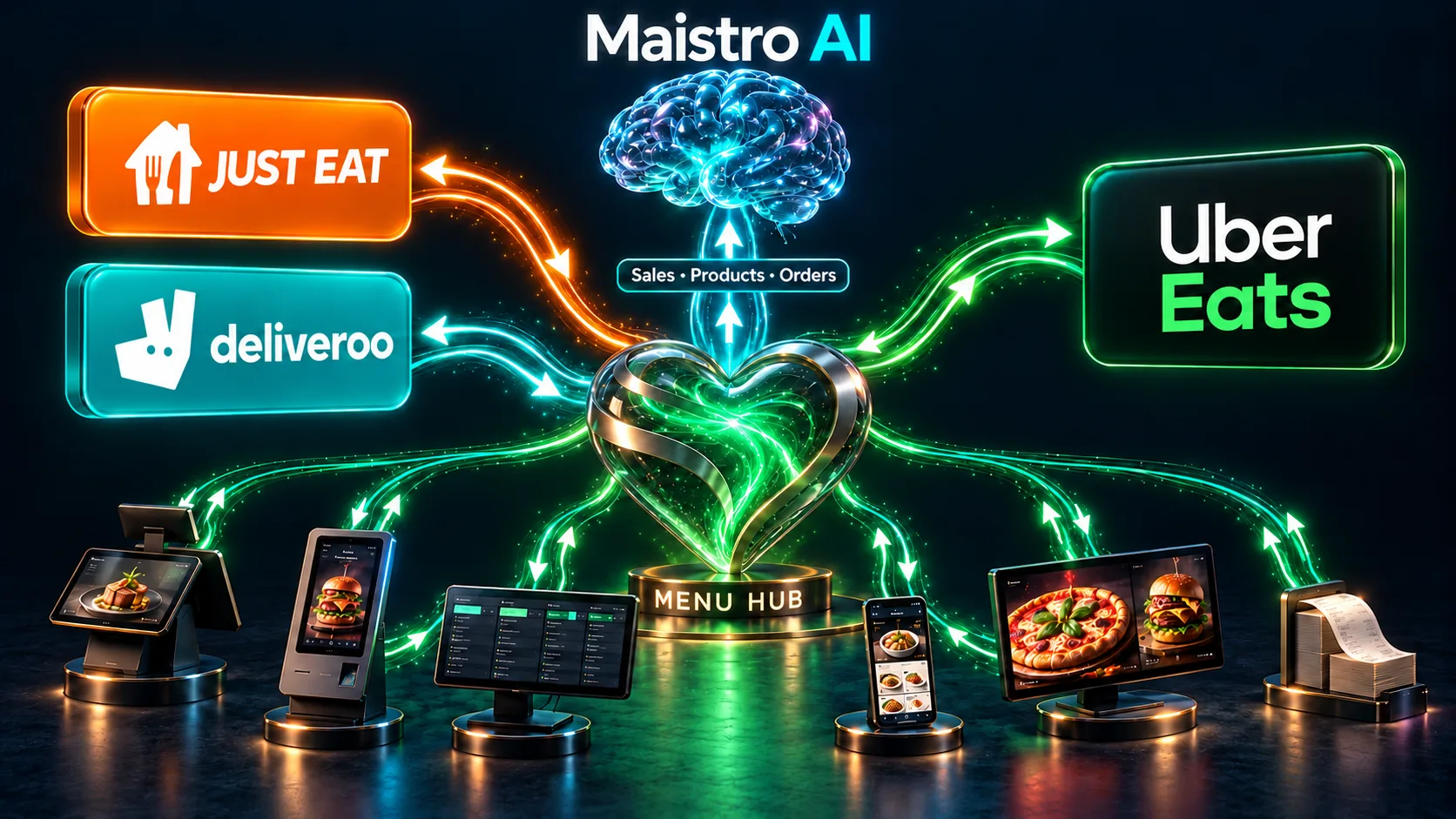
Menu management sits at the heart of your operation: managing orders from every connected channel and updating menus centrally across your POS, kiosks, website, app, digital screens, Just Eat, Deliveroo and Uber Eats. Working hand in hand with Maistro, it keeps sales, product and order data flowing into the AI that helps you forecast, plan and run the business.
Central menu updates and order management, alongside your website, app, kiosks and POS.
YOUR POS. YOUR CHOICE.
Already using Square?
Maistro integrates with Square. You do not have to use our POS.
Another provider? Introduce us. We can look at integrating.
01 / ONE MENU
Update it centrally
Products, prices and availability across your connected menus, including Just Eat, Deliveroo and Uber Eats.
02 / ALL ORDERS
Keep service connected
Manage every connected ordering channel in one flow, working with the POS that suits your business.
03 / MAISTRO AI
Keep the data flowing
Feed sales, product and order information into Maistro to inform stock, staffing and HQ decisions.
Update every connected menu centrally+
Manage products, prices, sizes, modifiers, meal deals and availability in one place. Send updates to your connected POS, kiosks, website, app, digital signage and marketplace menus, including Just Eat, Deliveroo and Uber Eats. Keep what customers can order aligned across the operation.
Manage orders across all your channels+
Bring orders from your connected POS, kiosks, website, app, Voice AI and delivery marketplaces into one operational flow. Menu items and their options give the kitchen the information it needs to prepare each order, while stock usage stays linked to what was sold.
The heart feeds the brain+
Menus give Maistro the context behind every sale: what was ordered, through which channel and which ingredients it uses. That connected flow of sales, product and order data supports AI stock forecasts, staffing plans and the wider business view in HQ. Menu management and Maistro work together, from the plan to the next order.
Works with your POS+
You do not have to use our POS. Maistro integrates with Square, and we can explore connections with other POS providers. Introduce us to your provider so we can assess the integration and confirm the scope. If you need a POS, we can provide Boss It.
Connect the menu to ingredients and service+
Link products, sizes and modifiers to recipes and ingredient quantities so sales connect to stock and food costs. Keep kitchen displays and digital screens connected to the same menu information, with AI helping plan what to show and when.
WHY IT MATTERS
The heart keeps menus and orders moving. The brain turns that connected data into a better plan for stock, staffing and the whole business.
Full integrations with Just Eat, Deliveroo and Uber Eats. Square integration is available; other POS connections are assessed with your provider.
06 Digital menus & signage
Screens that follow the sales picture.
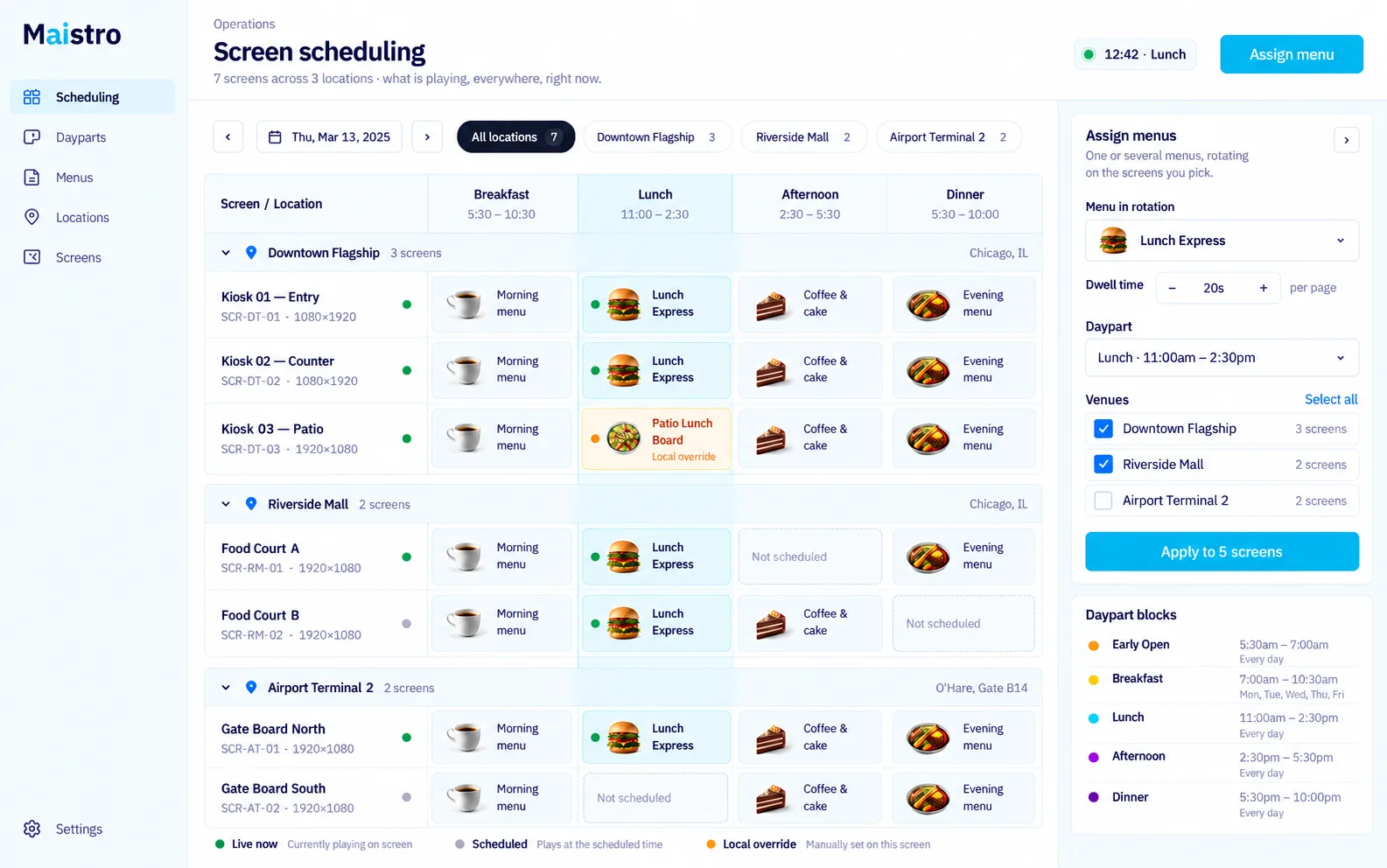
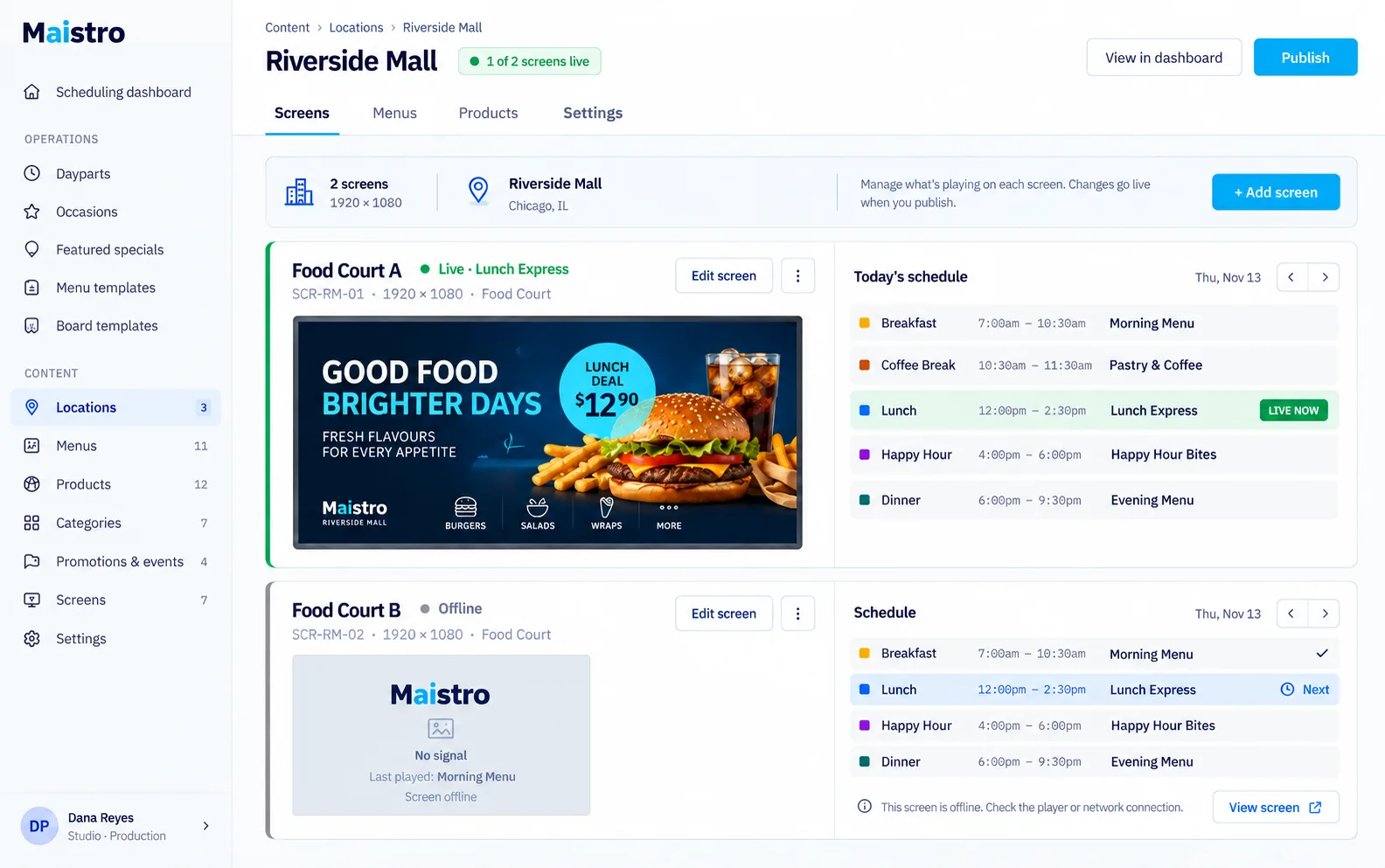
Digital menus connect to your POS and AI. Schedule menus, change prices and pause products from the POS, while AI uses sales at different times and on different days to inform menu and order scheduling.
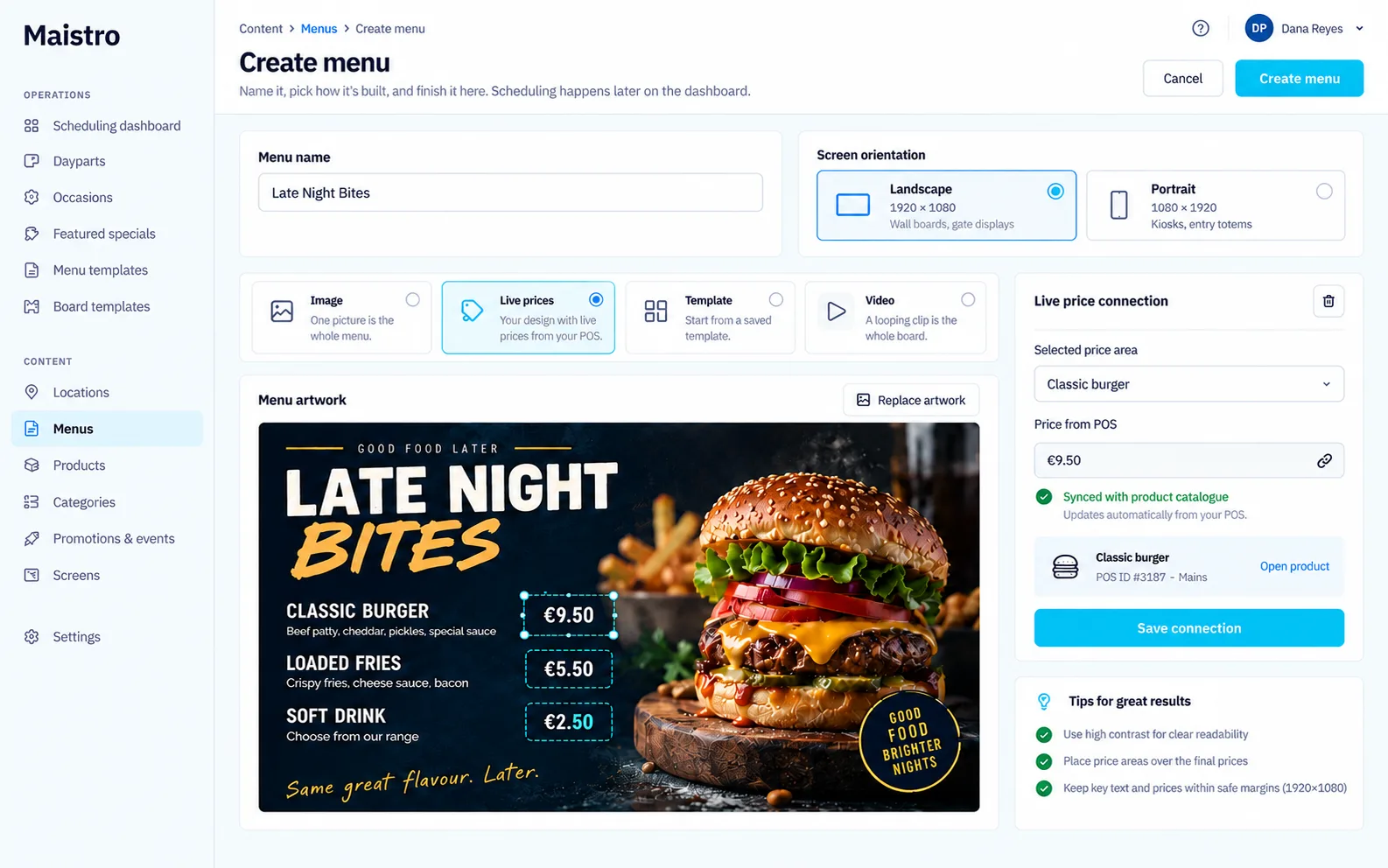
Plan every screen. Connect your prices. Manage every location.Illustrative product previews · Open full size for a closer look.
Your menu board can do more than look busy.
Control the menu from the POS+
Schedule menus, change a price or pause a product from the POS. Keep customer-facing digital menus connected to the operation, so the screens reflect what you want to sell.
AI-led menu and order scheduling+
AI uses the sales picture to inform menu and order scheduling. Timing is based on how sales vary across different parts of the day and different days of the week.
Different times. Different trading patterns.+
Lunch on a weekday and service at the weekend may have different sales patterns. Maistro uses sales at those different times and days to shape scheduling, rather than treating every trading period as identical.
WHY IT MATTERS
Menu and order scheduling informed by how your restaurant trades throughout the week.
We’ll walk through menu and order scheduling using your POS, sales patterns and screen setup.
07 Drivers & dispatch
Less dispatch juggling. More orders moving.
Maistro connects live driver tracking with automatic dispatch and route planning. Driver availability also feeds into the kitchen workflow, helping preparation and delivery work to the same timing.
The kitchen and the drivers should be on speaking terms.
Live driver tracking+
See the live driver picture alongside the delivery operation. Tracking gives the team visibility while dispatch and route planning coordinate the work.
Auto dispatch+
Maistro automatically dispatches delivery work, reducing the need to coordinate each assignment manually. Dispatch sits alongside driver tracking and route planning as part of the delivery workflow.
Route planning+
Route planning helps organise the delivery journey. It works alongside dispatch so getting an order out of the restaurant and planning its route are part of the same process.
A kitchen that knows about driver availability+
The kitchen syncs with drivers and can hold orders until drivers are available. That connects preparation timing to the delivery situation, helping avoid food being prepared only to wait for someone to take it.
WHY IT MATTERS
Coordinate preparation and delivery as one operation, with less manual dispatch work.
Dispatch, routes and kitchen timing work together. The delivery workflow is configured around your operation.
08 Online, CRM & marketing
Own the order. Build the next one.
Take direct orders through your own website and app, build your customer database and bring people back with marketing, loyalty and offers. Email, push notifications, SMS, loyalty and discounts run from one place.
Your website. Your app. Your customer relationship.
Your own website and app+
Give customers a direct route to your restaurant for online ordering. Connect the menu, collection and delivery options with the operation that fulfils the order. Your customers have a place to return that belongs to your business.
CRM and customer relationships+
Build a customer database around your direct relationships. Customer records and ordering history give repeat business a foundation beyond individual transactions, with communication guided by customer preferences.
Email, push and SMS+
Manage email, app push notifications and SMS from one place. Bring the channels together around your customer relationships, rather than managing each as a disconnected activity.
Loyalty, discounts and offers+
Use loyalty and offers to give customers a reason to come back. Review the repeat business and margin an offer creates, alongside redemptions, so a busy promotion is also a useful one.
More control over margin and business value+
Direct orders can reduce reliance on aggregator commission. Account for payment, platform, delivery and marketing costs when comparing margins. An established direct customer base and CRM also build an asset for your business; the effect on valuation depends on the business and its performance.
WHY IT MATTERS
Build repeat direct sales, keep more control over the customer relationship and develop a valuable customer asset.
Use customer preferences and permissions to guide your communications, and judge campaigns by repeat business as well as sales.
09 POS & kiosks
At the counter. At the table. On the screen.
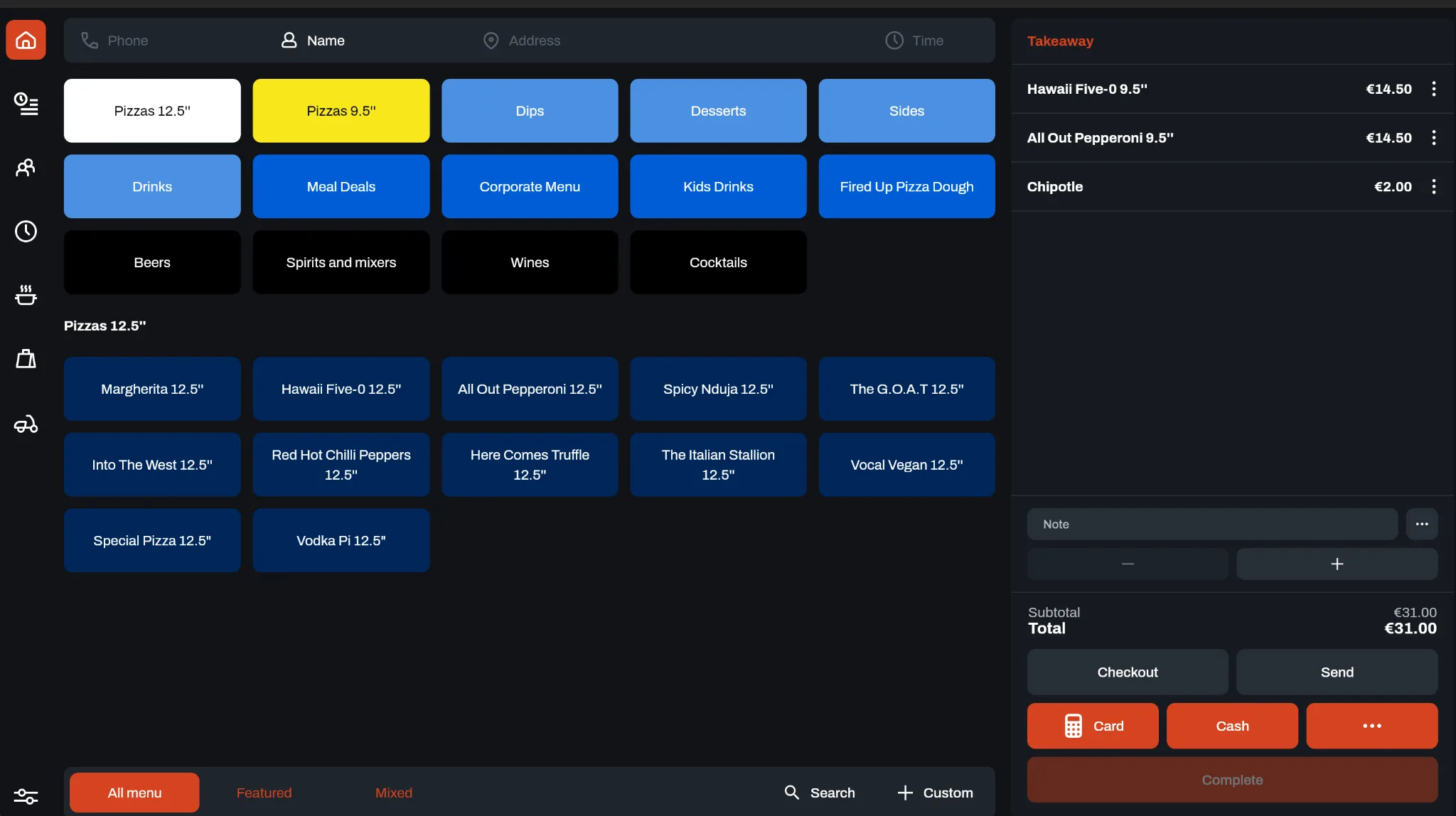
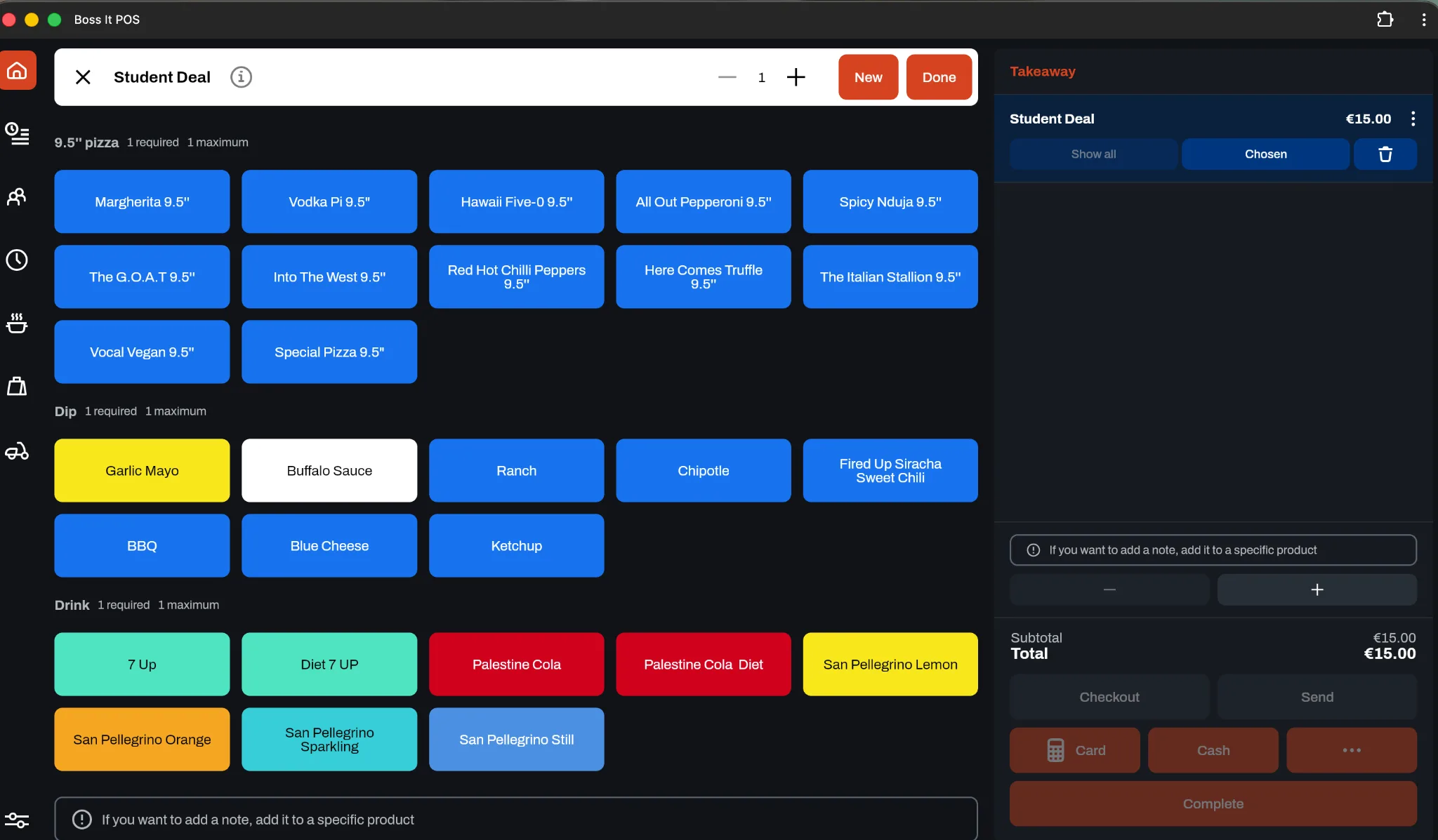
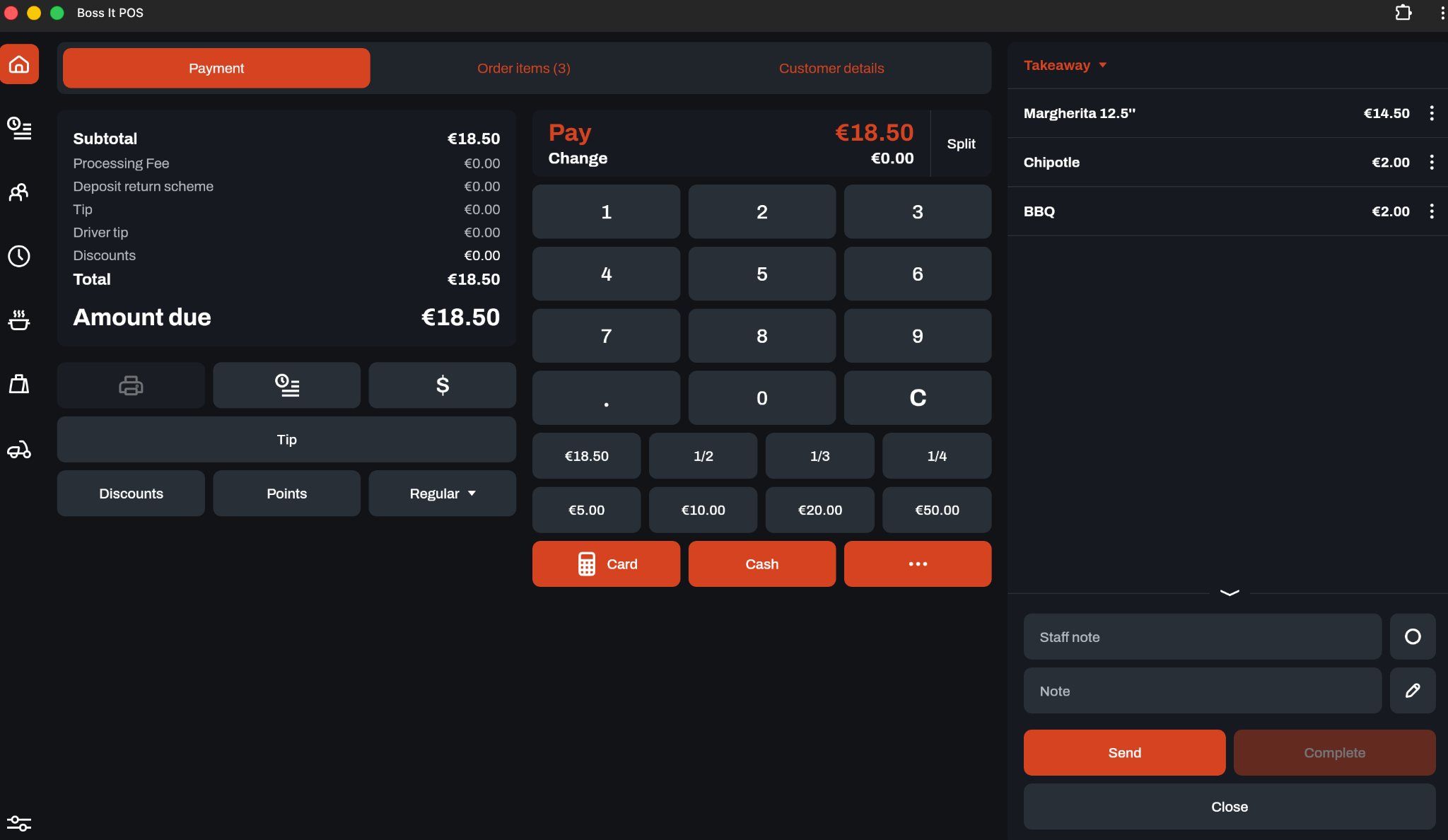
Maistro POS brings counter, table and online sales into one screen, with drivers alongside. Self-service kiosks give customers another way to order, customise their meal and see relevant upsells. Both connect to the menu at the heart of your operation.
Handle counter, table and online sales in one place, with drivers alongside. The team can work from a joined-up view of the operation instead of treating each incoming channel as a separate job.
Kiosks: let customers build their order+
Customers browse the menu and order for themselves. Sizes, choices, modifiers and meal deals help them build the meal they want, with the detail captured for fulfilment.
Relevant upsells+
Kiosks can show upsell options during ordering. A side, drink or other suitable addition gives customers an easy way to complete the meal while keeping the choice with them.
Connected to the kitchen+
POS and kiosk orders connect to the kitchen workflow. The menu choices recorded at ordering give the team the detail they need to prepare the meal.
Your choice of POS+
You do not have to use Maistro’s POS. Maistro integrates with Square, and we can look at integrating with another POS provider if you introduce us. The Menus section explains the wider channel connections.
WHY IT MATTERS
A clearer service view for the team and more ways for customers to place an order.
Use Maistro’s POS and kiosks where they fit, or talk to us about connecting the tools you already use.
10 Kitchen coordination
Right order. Right time. Right screen.
Maistro coordinates which order reaches which kitchen screen and when. It also syncs with drivers, holding orders until drivers are available so the kitchen and delivery operation can work to the same timing.
Order routing connects incoming work to the kitchen screen where it is needed. The purpose is straightforward: give the relevant team the order they need to work on, where they need to see it.
Timing is part of the workflow+
Getting an order into the kitchen is only half the job. Maistro coordinates when it reaches the relevant screen, helping the team work on the right order at the right time.
Hold orders until drivers are available+
The kitchen syncs with the driver operation and holds orders until a driver is available. Preparation can therefore take delivery availability into account, rather than treating the kitchen and dispatch as separate queues.
WHY IT MATTERS
A more coordinated path from the incoming order to preparation and delivery.
The kitchen workflow and screen setup are matched to how your restaurant prepares and fulfils orders.
11 Your POS. Your choice.
Keep your POS. Or let us provide Boss It.
You do not need to replace your POS to use Maistro. Connect your existing system where an integration is available, or choose the Boss It POS we provide. We bring your tools and data together so you can use Maistro to forecast, plan and manage your business.
Square is integrated. For other providers, introduce us and we can explore the connection.
CHOOSE BOSS IT
We can provide your POS
Use Boss It with the connected tools your operation needs, from kiosks to kitchen screens.
Already have a POS?+
Maistro integrates with Square, so you can connect it without switching to our POS. Using another provider? Introduce us and we can assess an integration together, including which data and workflows can be connected.
Need a POS? We can provide Boss It.+
If you need a new POS or are starting from scratch, we can provide Boss It. We can also supply the connected tools you need, including kiosks, kitchen displays, online ordering and driver management, as part of the agreed setup.
Start with what matters most+
Tell us how many venues you run, the tools you use and where you want to improve first: stock costs, staffing, phone orders, direct sales or visibility across the group. We will work with you to choose the Maistro modules and connections that fit.
Connect, test and roll out+
Together, we agree the integrations, equipment, data preparation, training, support, pricing and timing. Then we test the real service workflow with your team before expanding across the business.
WHY IT MATTERS
A connected operation built around your business, whether you keep your current POS or choose Boss It.
Square integration is available. Connections to other POS providers are assessed individually; scope and rollout are agreed with you and your provider.
YOUR RESTAURANT. WHAT’S THE HEADACHE?
Let’s talk it through.
Phones ringing off the hook? Food costs creeping up? Tell us what’s getting in the way. We’ll start there.